
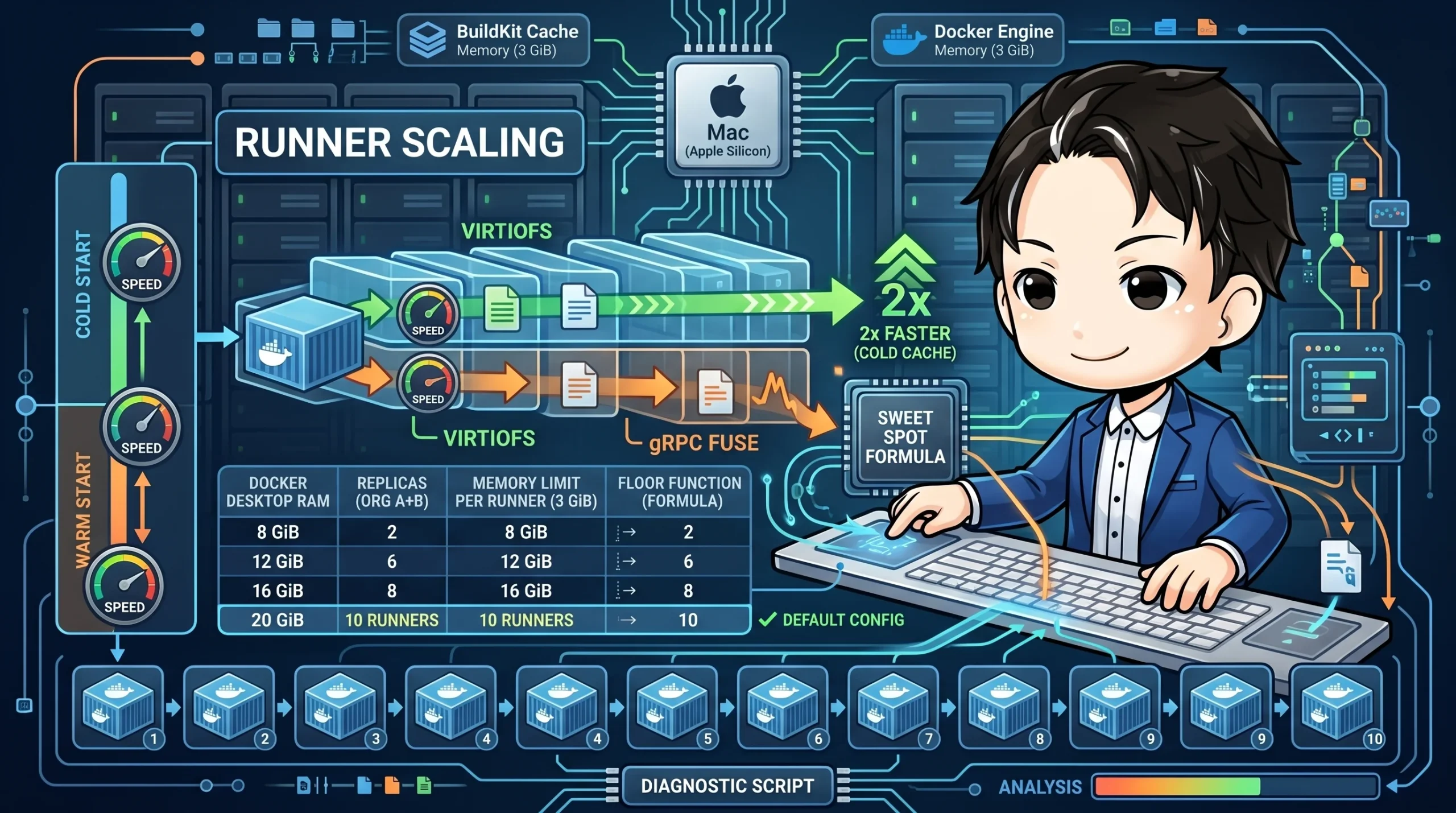
We run GitHub Actions Self-hosted Runners using Docker Compose. Our setup involves running containerized runners for multiple organizations in parallel on a single Mac (Apple Silicon).
The key question is, "How many can we run in parallel?" Too few, and pull requests get congested. Too many, and they all crash due to Out-Of-Memory (OOM) errors. This article documents the process we used to find the sweet spot, based on VirtioFS benchmarks, memory usage measurements during idle and workload states, and recommended Docker Desktop settings.
## The Formula for the Sweet Spot
Let's start with the conclusion.
```
Recommended scale count = floor((Docker Desktop Memory - 2 GiB - 1 GiB) / 3 GiB)
```
- **2 GiB**: Resident memory for the Docker Desktop VM (linuxkit) + Docker Engine
- **1 GiB**: Working space for the BuildKit cache
- **3 GiB**: `mem_limit` per container (based on peak usage from vitest + coverage)
| Docker Desktop Memory | Recommended Scale (org A + org B) | Notes |
|---|---|---|
| 8 GiB | 1 + 1 (2 runners) | Minimal OOM margin, not recommended for regular use |
| 12 GiB | 3 + 3 (6 runners) | Change `REPLICAS=3` in `.env` |
| 16 GiB | 4 + 4 (8 runners) | Can be adjusted between orgs based on PR ratio |
| **20 GiB** | **5 + 5 (10 runners)** | **Default setting** |
Below, we'll explain the process used to derive this table.
## VirtioFS Benchmarks: 2x Faster with a Cold Cache
Docker Desktop offers two file-sharing implementations: gRPC FUSE and VirtioFS. We benchmarked both to see which is faster for our Self-hosted Runners.
### Benchmark Environment
- Docker Desktop 8 GiB, scale=3+3
- named volume mount (not a bind mount)
- For each condition: 1 warmup run → 2 measurement runs → median value taken
### Results
| Benchmark | gRPC FUSE | VirtioFS | Improvement |
|---|---|---|---|
| Creating 20,000 files (/tmp = direct ext4) | 78 ms | 77 ms | 0% |
| npm install warm cache (158 pkgs re-extracted) | 832 ms | 842 ms | 0% |
| **npm install cold cache (158 pkgs, first time)** | **10 s** | **5 s** | **2x** |
There's no difference for direct I/O within the container's ext4 filesystem or with a warm cache. The difference appears during an **npm install with a cold cache**. This results in a 2x speed difference when the cache is empty, such as at the start of the week or after dependency updates.
Another important factor is **stability**. gRPC FUSE showed significant variance between runs (run1: 1786ms, run2: 832ms), while VirtioFS was consistent (run1: 872ms, run2: 842ms).
**Conclusion**: VirtioFS is a must. We found no scenario where gRPC FUSE had an advantage.
## Measuring Idle Memory Usage
To determine the scale count, we need to know the memory consumption per container.
### Measurement Conditions
- `tests/smoke-scale-startup.sh` PASSES=1 (startup → registration → idle)
- Cold cache state
### Results
| SCALE | Peak Idle per Container | Total | Container Count |
|---|---|---|---|
| 1 | 40 MiB | 81 MiB | 2 (1 per org) |
| 3 | 40 MiB | 238 MiB | 6 (3 per org) |
| 5 | 40 MiB | 408 MiB | 10 (5 per org) |
During idle, memory usage is stable at **about 40 MiB per container**, regardless of the scale. The problem is during workloads. When running `vitest` + coverage, memory usage approaches the `mem_limit: 3g` ceiling.
This means we must base our scale count on the **peak workload (3 GiB)**, not the idle memory.
## Container Resource Limits
We set resource limits for each container in Docker Compose.
```yaml
x-runner-base: &runner-base
mem_limit: 3g
mem_reservation: 512m
pids_limit: 4096
ulimits:
nofile:
soft: 65536
hard: 65536
nproc: 4096
tmpfs:
- /tmp:size=512m,mode=1777,nosuid,nodev
- /dev/shm:size=256m,mode=1777,nosuid,nodev
```
### Intent of Each Setting
**`mem_limit: 3g`**
Determined from the peak consumption of vitest + coverage. Since tmpfs (`/tmp` 512MB + `/dev/shm` 256MB) is included in this 3 GiB, we recommend setting Node.js's effective heap size with `--max-old-space-size=2048`.
**`pids_limit: 4096`**
A defense against fork bombs. Prevents a runaway process inside the container from consuming the host's PID table.
**`ulimits.nofile: 65536`**
vitest's parallel workers consume a large number of file descriptors, so we've raised this from Docker's default of 1024.
**`tmpfs`**
Speeds up temporary file I/O during tests. By avoiding disk I/O, it also reduces I/O contention between containers.
## Recommended Docker Desktop Settings
### Resources Tab
```
CPU: 16 vCPU (for 5+5 scale. 8 vCPU for 3+3)
Memory: 20 GiB (for 5+5 scale. 12 GiB for 3+3)
Swap: 1 GiB
Disk: 64 GB+ (margin for npm cache + image layers + buildx cache)
```
We aim for about 1.6 vCPU per container (e.g., 16 vCPUs for 10 containers). We recommend setting `VITEST_MAX_THREADS=2` for vitest's parallel workers—anything higher increases context switching between containers and becomes counterproductive.
### General Tab
- **File sharing implementation**: **VirtioFS** (Required)
- **Use containerd for pulling and storing images**: Recommended (Parallelizes pulls + improves image GC)
A full restart of Docker Desktop is required after changing these settings.
## Diagnostic Script
We've prepared a script to automatically check if the configuration is correct.
```bash
./scripts/diagnose-test-runner.sh
```
Example output:
```
Docker Desktop Configuration Diagnostics:
✓ CPU: 16 vCPU (Meets recommendation)
✓ Memory: 20 GiB (Meets recommendation)
✓ Storage Driver: overlayfs (containerd enabled)
? File sharing implementation: Manual check required
→ Go to Settings → General → Select "VirtioFS"
Per-service Resource Limits:
runner-biz-dev mem_limit: 3g mem_reservation: 512m
runner-const-room mem_limit: 3g mem_reservation: 512m
Resource Usage (snapshot):
NAME CPU% MEM USAGE
runner-biz-dev-1 0.30% 38.4MiB / 3GiB
runner-biz-dev-2 0.25% 41.2MiB / 3GiB
...
```
It also outputs troubleshooting steps for when tests fail.
```
Next troubleshooting steps:
A1. Does it reproduce without coverage: pnpm vitest run --no-coverage
A2. Does it reproduce with serialized forks: poolOptions.forks.singleFork
A3. Does it reproduce without parallel file execution: pnpm vitest run --no-file-parallelism
A4. Does it reproduce natively: runs-on: [self-hosted, macOS, ARM64, native, ...]
```
## Changing the Default from 3+3 to 5+5
Our initial default was 3+3 (assuming 12 GiB of memory), but we encountered the following issues in practice:
- When multiple PRs arrived simultaneously, a queue of 3 was not enough and jobs would get stuck.
- Since idle memory consumption is low (40 MiB/container), it's more efficient to increase the count on Macs with ample memory.
After increasing the Docker Desktop memory allocation to 20 GiB, we changed the default to **5+5**. For Macs with 12 GiB of memory or less, you can override this by setting `REPLICAS=3` in the `.env` file.
## Summary
| Decision Point | Conclusion |
|---|---|
| File Sharing Implementation | VirtioFS is required (2x faster with a cold cache) |
| Per-Container Memory Limit | 3 GiB (peak for vitest + coverage) |
| Recommended Scale Count | floor((DD Memory - 3 GiB) / 3 GiB) |
| Default Configuration | 5+5 (for 20 GiB), switch to 3+3 (for 12 GiB) via `.env` |
The right approach to scaling isn't "more is better," but rather to calculate it backwards from the memory limit and peak workload consumption. Having a diagnostic script allows you to reproduce this decision-making process even when the environment changes.

## Reference Links
- [Docker Desktop - VirtioFS](https://docs.docker.com/desktop/settings/mac/#file-sharing-implementation)
- [Docker Compose - deploy resources](https://docs.docker.com/compose/compose-file/deploy/#resources)

We run GitHub Actions Self-hosted Runners using Docker Compose. Our setup involves running containerized runners for multiple organizations in parallel on a single Mac (Apple Silicon).
The key question is, "How many can we run in parallel?" Too few, and pull requests get congested. Too many, and they all crash due to Out-Of-Memory (OOM) errors. This article documents the process we used to find the sweet spot, based on VirtioFS benchmarks, memory usage measurements during idle and workload states, and recommended Docker Desktop settings.
The Formula for the Sweet Spot
Let's start with the conclusion.
Recommended scale count = floor((Docker Desktop Memory - 2 GiB - 1 GiB) / 3 GiB)
- 2 GiB: Resident memory for the Docker Desktop VM (linuxkit) + Docker Engine
- 1 GiB: Working space for the BuildKit cache
- 3 GiB:
mem_limit per container (based on peak usage from vitest + coverage)
| Docker Desktop Memory |
Recommended Scale (org A + org B) |
Notes |
| 8 GiB |
1 + 1 (2 runners) |
Minimal OOM margin, not recommended for regular use |
| 12 GiB |
3 + 3 (6 runners) |
Change REPLICAS=3 in .env |
| 16 GiB |
4 + 4 (8 runners) |
Can be adjusted between orgs based on PR ratio |
| 20 GiB |
5 + 5 (10 runners) |
Default setting |
Below, we'll explain the process used to derive this table.
VirtioFS Benchmarks: 2x Faster with a Cold Cache
Docker Desktop offers two file-sharing implementations: gRPC FUSE and VirtioFS. We benchmarked both to see which is faster for our Self-hosted Runners.
Benchmark Environment
- Docker Desktop 8 GiB, scale=3+3
- named volume mount (not a bind mount)
- For each condition: 1 warmup run → 2 measurement runs → median value taken
Results
| Benchmark |
gRPC FUSE |
VirtioFS |
Improvement |
| Creating 20,000 files (/tmp = direct ext4) |
78 ms |
77 ms |
0% |
| npm install warm cache (158 pkgs re-extracted) |
832 ms |
842 ms |
0% |
| npm install cold cache (158 pkgs, first time) |
10 s |
5 s |
2x |
There's no difference for direct I/O within the container's ext4 filesystem or with a warm cache. The difference appears during an npm install with a cold cache. This results in a 2x speed difference when the cache is empty, such as at the start of the week or after dependency updates.
Another important factor is stability. gRPC FUSE showed significant variance between runs (run1: 1786ms, run2: 832ms), while VirtioFS was consistent (run1: 872ms, run2: 842ms).
Conclusion: VirtioFS is a must. We found no scenario where gRPC FUSE had an advantage.
Measuring Idle Memory Usage
To determine the scale count, we need to know the memory consumption per container.
Measurement Conditions
tests/smoke-scale-startup.sh PASSES=1 (startup → registration → idle)
- Cold cache state
Results
| SCALE |
Peak Idle per Container |
Total |
Container Count |
| 1 |
40 MiB |
81 MiB |
2 (1 per org) |
| 3 |
40 MiB |
238 MiB |
6 (3 per org) |
| 5 |
40 MiB |
408 MiB |
10 (5 per org) |
During idle, memory usage is stable at about 40 MiB per container, regardless of the scale. The problem is during workloads. When running vitest + coverage, memory usage approaches the mem_limit: 3g ceiling.
This means we must base our scale count on the peak workload (3 GiB), not the idle memory.
Container Resource Limits
We set resource limits for each container in Docker Compose.
x-runner-base: &runner-base
mem_limit: 3g
mem_reservation: 512m
pids_limit: 4096
ulimits:
nofile:
soft: 65536
hard: 65536
nproc: 4096
tmpfs:
- /tmp:size=512m,mode=1777,nosuid,nodev
- /dev/shm:size=256m,mode=1777,nosuid,nodev
Intent of Each Setting
mem_limit: 3g
Determined from the peak consumption of vitest + coverage. Since tmpfs (/tmp 512MB + /dev/shm 256MB) is included in this 3 GiB, we recommend setting Node.js's effective heap size with --max-old-space-size=2048.
pids_limit: 4096
A defense against fork bombs. Prevents a runaway process inside the container from consuming the host's PID table.
ulimits.nofile: 65536
vitest's parallel workers consume a large number of file descriptors, so we've raised this from Docker's default of 1024.
tmpfs
Speeds up temporary file I/O during tests. By avoiding disk I/O, it also reduces I/O contention between containers.
Recommended Docker Desktop Settings
Resources Tab
CPU: 16 vCPU (for 5+5 scale. 8 vCPU for 3+3)
Memory: 20 GiB (for 5+5 scale. 12 GiB for 3+3)
Swap: 1 GiB
Disk: 64 GB+ (margin for npm cache + image layers + buildx cache)
We aim for about 1.6 vCPU per container (e.g., 16 vCPUs for 10 containers). We recommend setting VITEST_MAX_THREADS=2 for vitest's parallel workers—anything higher increases context switching between containers and becomes counterproductive.
General Tab
- File sharing implementation: VirtioFS (Required)
- Use containerd for pulling and storing images: Recommended (Parallelizes pulls + improves image GC)
A full restart of Docker Desktop is required after changing these settings.
Diagnostic Script
We've prepared a script to automatically check if the configuration is correct.
./scripts/diagnose-test-runner.sh
Example output:
Docker Desktop Configuration Diagnostics:
✓ CPU: 16 vCPU (Meets recommendation)
✓ Memory: 20 GiB (Meets recommendation)
✓ Storage Driver: overlayfs (containerd enabled)
? File sharing implementation: Manual check required
→ Go to Settings → General → Select "VirtioFS"
Per-service Resource Limits:
runner-biz-dev mem_limit: 3g mem_reservation: 512m
runner-const-room mem_limit: 3g mem_reservation: 512m
Resource Usage (snapshot):
NAME CPU% MEM USAGE
runner-biz-dev-1 0.30% 38.4MiB / 3GiB
runner-biz-dev-2 0.25% 41.2MiB / 3GiB
...
It also outputs troubleshooting steps for when tests fail.
Next troubleshooting steps:
A1. Does it reproduce without coverage: pnpm vitest run --no-coverage
A2. Does it reproduce with serialized forks: poolOptions.forks.singleFork
A3. Does it reproduce without parallel file execution: pnpm vitest run --no-file-parallelism
A4. Does it reproduce natively: runs-on: [self-hosted, macOS, ARM64, native, ...]
Changing the Default from 3+3 to 5+5
Our initial default was 3+3 (assuming 12 GiB of memory), but we encountered the following issues in practice:
- When multiple PRs arrived simultaneously, a queue of 3 was not enough and jobs would get stuck.
- Since idle memory consumption is low (40 MiB/container), it's more efficient to increase the count on Macs with ample memory.
After increasing the Docker Desktop memory allocation to 20 GiB, we changed the default to 5+5. For Macs with 12 GiB of memory or less, you can override this by setting REPLICAS=3 in the .env file.
Summary
| Decision Point |
Conclusion |
| File Sharing Implementation |
VirtioFS is required (2x faster with a cold cache) |
| Per-Container Memory Limit |
3 GiB (peak for vitest + coverage) |
| Recommended Scale Count |
floor((DD Memory - 3 GiB) / 3 GiB) |
| Default Configuration |
5+5 (for 20 GiB), switch to 3+3 (for 12 GiB) via .env |
The right approach to scaling isn't "more is better," but rather to calculate it backwards from the memory limit and peak workload consumption. Having a diagnostic script allows you to reproduce this decision-making process even when the environment changes.

Reference Links