

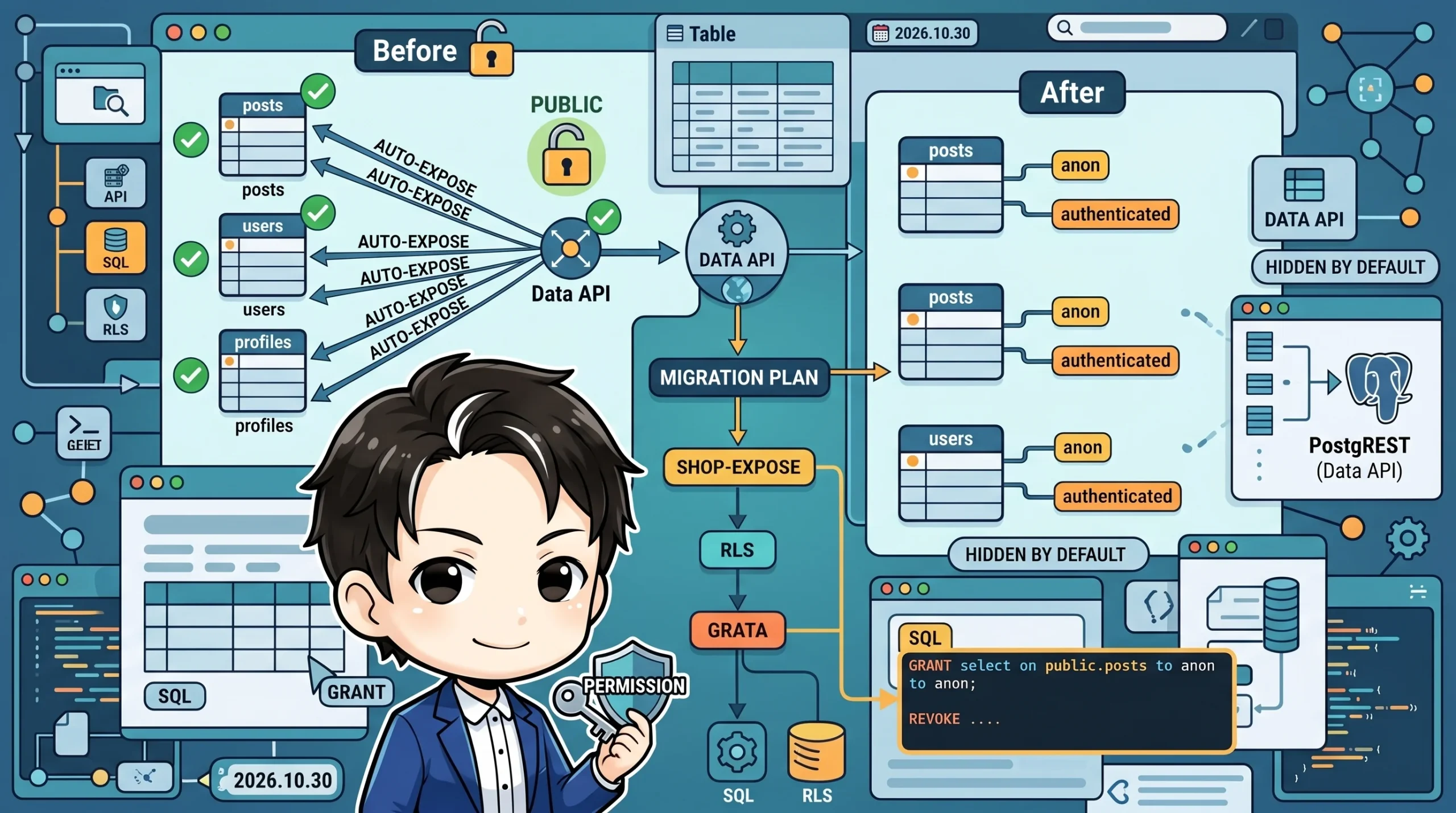
Supabase is changing the default behavior of its Data API. Starting May 30, 2026, for new projects and October 30 for existing projects, tables created in the public schema will no longer be automatically exposed to the Data API.
If you’re thinking, “Wait, it was automatic before?”—yes, it was. Until now, Supabase automatically exposed tables in the public schema to PostgREST (the Data API) and the GraphQL API. While you could control row-level access with RLS (Row Level Security), the existence of the tables themselves was visible via the API.
This article covers the full details of the change and provides concrete steps to migrate your existing projects to use explicit GRANTs.
What’s Changing
Before: Implicit Full Exposure
Previously, when you created a table in the public schema, Supabase would automatically grant SELECT, INSERT, UPDATE, DELETE permissions to the anon, authenticated, and service_role roles.
-- The previous implicit behavior (executed behind the scenes without user input)
alter default privileges in schema public
  grant all on tables to anon, authenticated, service_role;
This meant that the moment you ran CREATE TABLE, the table was accessible via the Data API.
After: Explicit GRANT Required
For new projects created after May 30 (and all projects after October 30), creating a table will not expose it to the Data API. You must explicitly grant access using a GRANT statement.
create table public.posts (
  id uuid primary key default gen_random_uuid(),
  user_id uuid references auth.users(id) not null,
  title text not null,
  body text,
  created_at timestamptz default now()
);

-- Without this, the table is not visible to the Data API
grant select on public.posts to anon;
grant select, insert, update, delete on public.posts to authenticated;

alter table public.posts enable row level security;

create policy "Users can only operate on their own posts"
  on public.posts
  for all
  to authenticated
  using (auth.uid() = user_id);
If you forget to write the GRANT, PostgREST will return error code 42501. The error message will include the necessary SQL to fix it, so you’ll notice even if you miss it.
The Four-Stage Rollout
| Date | Details |
|---|---|
| April 28 | Opt-in available at project creation (via “Automatic Exposure” checkbox) |
| May 18 | pg_graphql is disabled by default for new projects |
| May 30 | Automatic exposure is OFF by default for new projects |
| October 30 | Change applies to existing projects |
GRANTs on existing tables will not be revoked. This change only affects new tables created after the effective date.
Why is This Change Necessary?
1. Implicit Exposure is a Security Risk
Even for the brief period before RLS was configured, tables were readable and writable via the API. This created a risk of data exposure in the window between running CREATE TABLE and writing the RLS policies during development.
2. Compatibility with Declarative Code
Explicit GRANT statements are recorded in migration files. This makes them reviewable, diffable, and greppable—allowing you to track permission changes through code reviews.
3. Role-Based Permissions are Visible
The required permissions often differ between anon (unauthenticated) and authenticated users. With explicit GRANTs, this difference becomes immediately obvious in your migration files.
-- Grant SELECT only to anon (for viewing public information)
grant select on public.posts to anon;

-- Allow full CRUD for authenticated users (with row-level control via RLS)
grant select, insert, update, delete on public.posts to authenticated;
4. Better Synergy with AI Coding Tools
We are in an era where AI tools like Cursor, Claude Code, and GitHub Copilot can auto-generate migrations. If they rely on implicit exposure, they might generate a CREATE TABLE statement but forget the GRANT. By making explicit GRANTs mandatory, AI tools (and the prompts used to guide them) will learn the correct pattern.
Supabase has published an open-source instruction set called Agent Skills to help teach Claude Code and Copilot the correct patterns.
Real Project: Before vs. After
Let’s look at how this will change in a real, operational project.
Before: The grant all Pattern (Most Current Projects)
-- A common pattern seen in initial migrations
grant all on all tables in schema public
  to anon, authenticated, service_role, postgres;

alter default privileges in schema public
  grant all on tables
  to anon, authenticated, service_role, postgres;
This single line exposes all tables with all permissions to all roles. While convenient, granting DELETE permission to the anon role is excessive.
After: The Least Privilege Pattern (Post-Migration)
-- Grant only the necessary permissions on a per-table basis
grant select on public.posts to anon;
grant select, insert, update, delete on public.posts to service_role;
grant select, insert, update, delete on public.posts to authenticated;

grant select on public.profiles to anon;
grant select, update on public.profiles to authenticated;
grant select, insert, update, delete on public.profiles to service_role;
Here, we explicitly define the role × operation combinations for each table. It increases the amount of code, but you can find out “what is exposed” with a single grep command.
# List all tables exposed to the anon role
grep -r "grant.*to anon" supabase/migrations/
Migration Steps
Step 1: Audit Your Current Setup
Check which tables are currently exposed to which roles using the Security Advisor in your Supabase Dashboard. The table editor will also now display a “Data API exposure” badge.
You can also check directly with SQL:
select
  grantee,
  table_name,
  string_agg(privilege_type, ', ' order by privilege_type) as privileges
from information_schema.table_privileges
where table_schema = 'public'
  and grantee in ('anon', 'authenticated', 'service_role')
group by grantee, table_name
order by table_name, grantee;
Step 2: Revoke Default Privileges
If you want to migrate an existing project early, first stop the default automatic grants.
-- Stop auto-GRANT for new tables
alter default privileges for role postgres in schema public
  revoke select, insert, update, delete on tables
  from anon, authenticated, service_role;

alter default privileges for role postgres in schema public
  revoke execute on functions
  from anon, authenticated, service_role;

alter default privileges for role postgres in schema public
  revoke usage, select on sequences
  from anon, authenticated, service_role;
Once you apply this migration, any tables created afterward will not be exposed to the Data API without an explicit GRANT. Permissions on existing tables will remain unchanged.
Step 3: Add Per-Table GRANTs to Migrations
If you want to apply the principle of least privilege to your existing tables, revoke the current grant all and then re-grant permissions on a per-table basis.
-- First, revoke everything
revoke all on all tables in schema public
  from anon, authenticated;

-- Then, re-grant on a per-table basis
grant select on public.posts to anon;
grant select, insert, update, delete on public.posts to authenticated;

grant select on public.profiles to anon;
grant select, update on public.profiles to authenticated;

-- Internal tables are not exposed even to authenticated
-- (accessed only by service_role or via RPC functions)
Step 4: Verify Your Local Development Environment
Run supabase db reset to replay your migrations from the beginning and confirm that your application works correctly. If the GRANTs are included in your migrations, the same permission structure will be replicated locally and in production.
supabase db reset
npm run dev
# Manually test the main features of your application
Step 5: Ensure Permission Consistency with CI
It’s a good idea to have your CI system detect when a migration diff includes a CREATE TABLE but not a corresponding GRANT.
#!/bin/bash
# pre-commit hook or CI step
for migration in supabase/migrations/*.sql; do
  tables=$(grep -oP 'create table (?:if not exists )?public\.([a-zA-Z0-9_]+)' "$migration" | \
           grep -oP 'public\.\w+')
  for table in $tables; do
    if ! grep -q "grant.*on ${table}" "$migration"; then
      echo "WARNING: ${migration} creates ${table} but has no GRANT statement"
    fi
  done
done
Revisiting the Two-Layer Security Model
This change is a good opportunity to review Supabase’s security model.
Layer 1: GRANT  → Controls "if" you can access a table
Layer 2: RLS    → Controls "which rows" you can operate on
Without a GRANT, RLS policies never even come into play. Conversely, if you have a GRANT but RLS is disabled, all rows are visible. The correct approach is to design with both layers in mind.
The best practice is to group the table creation, GRANT statements, and RLS policies into a single migration file.
-- Combine everything into one file
create table public.comments (...);

grant select on public.comments to anon;
grant select, insert, update, delete on public.comments to authenticated;

alter table public.comments enable row level security;

create policy "..." on public.comments ...;
Summary
| Item | Old Default | New Default |
|---|---|---|
| Table Exposure | Automatic | Explicit GRANT required |
| GraphQL | Enabled by default | Disabled by default |
| Existing Tables | Unaffected | Unaffected (new tables only) |
| Migration Deadline | — | October 30 for existing projects |
The next steps are clear:
- Now: Audit your current setup using the Security Advisor.
- By May 30: If you plan to create new projects, get familiar with the
GRANTpattern. - By October 30: Add explicit
GRANTstatements to the migrations for your existing projects.
This is a shift from “implicit full exposure” to “explicit least privilege.” While it may seem like a minor change, it’s an essential update for running Supabase in production. Having permissions declaratively recorded in your migration files is a change we should all welcome.