
How to solve composer install of private GitHub in OpenAI Codex with COMPOSER_AUTH
<p class="wp-block-paragraph">Hello, I'm Wakatchi (<a href="https://twitter.com/wakatchi_tech">@wakatchi_tech</a>).</p>
<p class="wp-block-paragraph">There are some required settings when connecting to a private GitHub repository with OpenAI Codex, so I'll make a note of them here.</p>
<h2 class="wp-block-heading" id="vk-htags-f017e58a-ecc6-4358-b807-d3c8e45e4983">TL;DR;</h2>
<p class="wp-block-paragraph" style="font-size:18px">If you want to access a private GitHub repository when resolving <strong>Composer</strong> dependencies in an OpenAI Codex environment, the standard approach is to pass <strong><span data-color="#ff6900" style="background: linear-gradient(transparent 60%,rgba(255, 105, 0, 0.7) 0);" class="vk_highlighter">COMPOSER_AUTH</span></strong>, which is a JSON wrapper around a GitHub PAT (Personal Access Token), as a secret.</p>
<p class="wp-block-paragraph" style="font-size:18px">You can use Composer's "environment variable-based authentication" mechanism as is, and Codex will automatically inject secrets into the container, so you don't have to commit unnecessary configuration files.</p>
<p class="wp-block-paragraph">When setting the secret in the Codex, don't forget to wrap it in JSON with < <code>github-oauth</code> > instead of the access token itself.</p>
<h2 class="wp-block-heading" id="vk-htags-89285c4e-8501-40d2-9e9f-435127c4c9fe">Introduction</h2>
<p class="wp-block-paragraph" style="font-size:18px">When I recently came across the Codex, < <code>composer install</code> > got stuck on <strong>404/authentication required.</strong></p>
<p class="wp-block-paragraph" style="font-size:18px">After some research, it seems that the Codex setup script runs under a Docker container + network restrictions, so Composer was unable to shake hands with GitHub.</p>
<p class="wp-block-paragraph" style="font-size:18px">The solution is to register <strong><span data-color="#ff6900" style="background: linear-gradient(transparent 60%,rgba(255, 105, 0, 0.7) 0);" class="vk_highlighter">COMPOSER_AUTH</span></strong> as a Codex secret... I came to this conclusion, which is a pretty obvious one, so I'll summarize the steps and some pitfalls as a memo. </p>
<div class="wp-block-vk-blocks-spacer vk_spacer vk_spacer-type-margin-top"><div class="vk_block-margin-md--margin-top"></div></div>
<div class="wp-block-vk-blocks-border-box vk_borderBox vk_borderBox-background-transparent has-text-color has-pale-cyan-blue-color is-style-vk_borderBox-style-solid-kado-tit-tab"><div class="vk_borderBox_title_container has-background has-pale-cyan-blue-background-color"><i class=""></i><h4 class="vk_borderBox_title"><strong>この記事は次のような方にお勧めです</strong></h4></div><div class="vk_borderBox_body">
<ul class="wp-block-list">
<li style="font-size:18px">Developers who want to run PHP/Composer projects on the OpenAI Codex</li>
<li style="font-size:18px">People who want to build projects that depend on private GitHub repositories</li>
<li style="font-size:18px">Engineers who want to make secret management smarter using CI/CD and cloud IDE</li>
<li style="font-size:18px"><code>composer install</code>People who are stuck on <strong>404 / authentication required</strong></li>
<li style="font-size:18px">People who want to learn best practices for <strong><span data-color="#ff6900" style="background: linear-gradient(transparent 60%,rgba(255, 105, 0, 0.7) 0);" class="vk_highlighter">PAT + COMPOSER_AUTH</span></strong></li>
</ul>
</div></div>
<hr class="wp-block-separator has-alpha-channel-opacity"/>
<div class="wp-block-vk-blocks-table-of-contents-new vk_tableOfContents vk_tableOfContents-style-default tabs"><div class="tab"><div class="vk_tableOfContents_title">Table of Contents</div><input type="checkbox" id="chck1"><label class="tab-label vk_tableOfContents_openCloseBtn button_status button_status-open" for="chck1" id="vk-tab-label">CLOSE</label><ul class="vk_tableOfContents_list tab_content-open">
<li class="vk_tableOfContents_list_item vk_tableOfContents_list_item-h-2">
<a href="#vk-htags-f017e58a-ecc6-4358-b807-d3c8e45e4983" class="vk_tableOfContents_list_item_link">
<span class="vk_tableOfContents_list_item_link_preNumber">1. </span>
TL;DR;
</a>
</li>
<li class="vk_tableOfContents_list_item vk_tableOfContents_list_item-h-2">
<a href="#vk-htags-89285c4e-8501-40d2-9e9f-435127c4c9fe" class="vk_tableOfContents_list_item_link">
<span class="vk_tableOfContents_list_item_link_preNumber">2. </span>
Introduction
</a>
</li>
<li class="vk_tableOfContents_list_item vk_tableOfContents_list_item-h-2">
<a href="#vk-htags-dbfefd0b-e066-4d5c-8198-1b7668718e7f" class="vk_tableOfContents_list_item_link">
<span class="vk_tableOfContents_list_item_link_preNumber">3. </span>
What is COMPOSER_AUTH anyway?
</a>
</li>
<li class="vk_tableOfContents_list_item vk_tableOfContents_list_item-h-2">
<a href="#vk-htags-d2a996e7-1bfc-421c-9b37-d6e65e5aa9c6" class="vk_tableOfContents_list_item_link">
<span class="vk_tableOfContents_list_item_link_preNumber">4. </span>
Why does the Codex require COMPOSER_AUTH?
</a>
</li>
<li class="vk_tableOfContents_list_item vk_tableOfContents_list_item-h-2">
<a href="#vk-htags-3d923c28-1f39-43d1-83cd-fcc3f0f58bd5" class="vk_tableOfContents_list_item_link">
<span class="vk_tableOfContents_list_item_link_preNumber">5. </span>
Registering secrets in the Codex environment
</a>
</li>
<li class="vk_tableOfContents_list_item vk_tableOfContents_list_item-h-2">
<a href="#vk-htags-35926af7-9d05-472a-ac9d-789cfaa1f8f4" class="vk_tableOfContents_list_item_link">
<span class="vk_tableOfContents_list_item_link_preNumber">6. </span>
Registering secrets in the Codex environment
</a>
</li>
<li class="vk_tableOfContents_list_item vk_tableOfContents_list_item-h-4">
<a href="#vk-htags-a84309fa-8f4c-4281-b9d5-02e91c191b61" class="vk_tableOfContents_list_item_link">
<span class="vk_tableOfContents_list_item_link_preNumber">6.1.1. </span>
404: Invalid access token
</a>
</li>
<li class="vk_tableOfContents_list_item vk_tableOfContents_list_item-h-4">
<a href="#vk-htags-139a447d-2891-41b1-b078-a302388c8e2a" class="vk_tableOfContents_list_item_link">
<span class="vk_tableOfContents_list_item_link_preNumber">6.1.2. </span>
Parse error due to newline in JSON
</a>
</li>
<li class="vk_tableOfContents_list_item vk_tableOfContents_list_item-h-4">
<a href="#vk-htags-2603cee0-75fc-413f-92a2-3893c5bc3427" class="vk_tableOfContents_list_item_link">
<span class="vk_tableOfContents_list_item_link_preNumber">6.1.3. </span>
Parse error due to newline in JSON
</a>
</li>
<li class="vk_tableOfContents_list_item vk_tableOfContents_list_item-h-4">
<a href="#vk-htags-626e2086-0272-4355-8600-6027b84becfa" class="vk_tableOfContents_list_item_link">
<span class="vk_tableOfContents_list_item_link_preNumber">6.1.4. </span>
Stack Overflow Case Studies
</a>
</li>
<li class="vk_tableOfContents_list_item vk_tableOfContents_list_item-h-2">
<a href="#vk-htags-2c2c0033-223e-4003-8438-078295fcf107" class="vk_tableOfContents_list_item_link">
<span class="vk_tableOfContents_list_item_link_preNumber">7. </span>
Conclusion
</a>
</li>
<li class="vk_tableOfContents_list_item vk_tableOfContents_list_item-h-6">
<a href="#vk-htags-d83403ff-52f5-4764-9ebc-928fc3e39b8d" class="vk_tableOfContents_list_item_link">
<span class="vk_tableOfContents_list_item_link_preNumber">7.1.1.1.1. </span>
References
</a>
</li>
</ul></div></div>
<h2 class="wp-block-heading" id="vk-htags-dbfefd0b-e066-4d5c-8198-1b7668718e7f">What is COMPOSER_AUTH anyway?</h2>
<ul class="wp-block-list">
<li style="font-size:18px">Composerは<code>auth.json</code>の代わりに<strong><span data-color="#ff6900" style="background: linear-gradient(transparent 60%,rgba(255, 105, 0, 0.7) 0);" class="vk_highlighter">COMPOSER_AUTH</span></strong>環境変数を読む機能を持つ。</li>
<li style="font-size:18px">The value is just the same JSON as < <code>auth.json</code><code>{"github-oauth":{"github.com":"ghp_xxxxx..."}}</code> > stored “on one line” (in the Codex, just paste it into the secret described below).</li>
</ul>
<p class="wp-block-paragraph" style="font-size:18px">This method does not require you to store authentication information in the repository, so it is safe from a GitOps perspective.<sup data-fn="9c31462e-15b1-424f-bb7e-231d527049bd" class="fn"><a id="9c31462e-15b1-424f-bb7e-231d527049bd-link" href="#9c31462e-15b1-424f-bb7e-231d527049bd">1</a></sup></p>
<div class="wp-block-vk-blocks-alert vk_alert alert alert-warning has-alert-icon"><div class="vk_alert_icon"><div class="vk_alert_icon_icon"><i class="fa-solid fa-circle-info" aria-hidden="true"></i></div><div class="vk_alert_icon_text"><span></span></div></div><div class="vk_alert_content">
<h3 class="wp-block-heading"><code>GITHUB_TOKEN </code>So that's not okay?</h3>
<p class="wp-block-paragraph" style="font-size:18px">In GitHub Actions, you can <code>GITHUB_TOKEN</code>s using the automatically generated < <strong>wpml_ignored_tag</strong> >.<br/>However...</p>
<ol class="wp-block-list">
<li style="font-size:18px"><strong>Narrow scope of effect</strong><br/>< <code>GITHUB_TOKEN</code> > is limited to that repository, so it is not sufficient in cases where you want to resolve cross-organizational dependencies.</li>
<li style="font-size:18px"><strong>Short-lived</strong>: Issued for each runner execution and cannot be reused by external services (such as Composer containers).</li>
<li style="font-size:18px"><strong>Not compatible with Composer's authentication format</strong><br/>Composer will not recognize < <code>GITHUB_TOKEN</code> > if you simply pass it to the environment variable, so you need to rewrite < <code>auth.json</code> > with an additional script.</li>
</ol>
<p class="wp-block-paragraph" style="font-size:18px">Considering these points, it is easier and safer to put <span data-color="#ff6900" style="background: linear-gradient(transparent 60%,rgba(255, 105, 0, 0.7) 0);" class="vk_highlighter">COMPOSER_AUTH</span> as a secret, as it is always available and can be done with just one JSON.</p>
<p class="wp-block-paragraph" style="font-size:18px">"Dedicated PAT" rather than "limited token" is the GitOps best practice.</p>
</div></div>
<hr class="wp-block-separator has-alpha-channel-opacity"/>
<h2 class="wp-block-heading" id="vk-htags-d2a996e7-1bfc-421c-9b37-d6e65e5aa9c6">Why does the Codex require COMPOSER_AUTH?</h2>
<ol class="wp-block-list">
<li style="font-size:18px">Codex is designed to run code in isolated containers, either locally or in the cloud</li>
<li style="font-size:18px">The container does not have a GitHub PAT, so the app cannot obtain the dependent libraries it needs,<code>composer install</code> and fails.</li>
<li style="font-size:18px">Codex's <em>Environment <>> Secrets</em> can pass environment variables and secrets.</li>
<li style="font-size:18px">Works well with Composer's environment variable authentication → <strong><span data-color="#ff6900" style="background: linear-gradient(transparent 60%,rgba(255, 105, 0, 0.7) 0);" class="vk_highlighter">COMPOSER_AUTH</span> is the only choice</strong></li>
</ol>
<p class="wp-block-paragraph">The same steps are covered in a how-to article on dev.to, and are a common path for many PHP developers.<sup data-fn="741a1138-3db3-4a17-be42-b24867f8b82a" class="fn"><a id="741a1138-3db3-4a17-be42-b24867f8b82a-link" href="#741a1138-3db3-4a17-be42-b24867f8b82a">2</a></sup></p>
<hr class="wp-block-separator has-alpha-channel-opacity"/>
<div class="wp-block-vk-blocks-spacer vk_spacer vk_spacer-type-margin-top"><div class="vk_block-margin-sm--margin-top"></div></div>
<h2 class="wp-block-heading" id="vk-htags-3d923c28-1f39-43d1-83cd-fcc3f0f58bd5">Registering secrets in the Codex environment</h2>
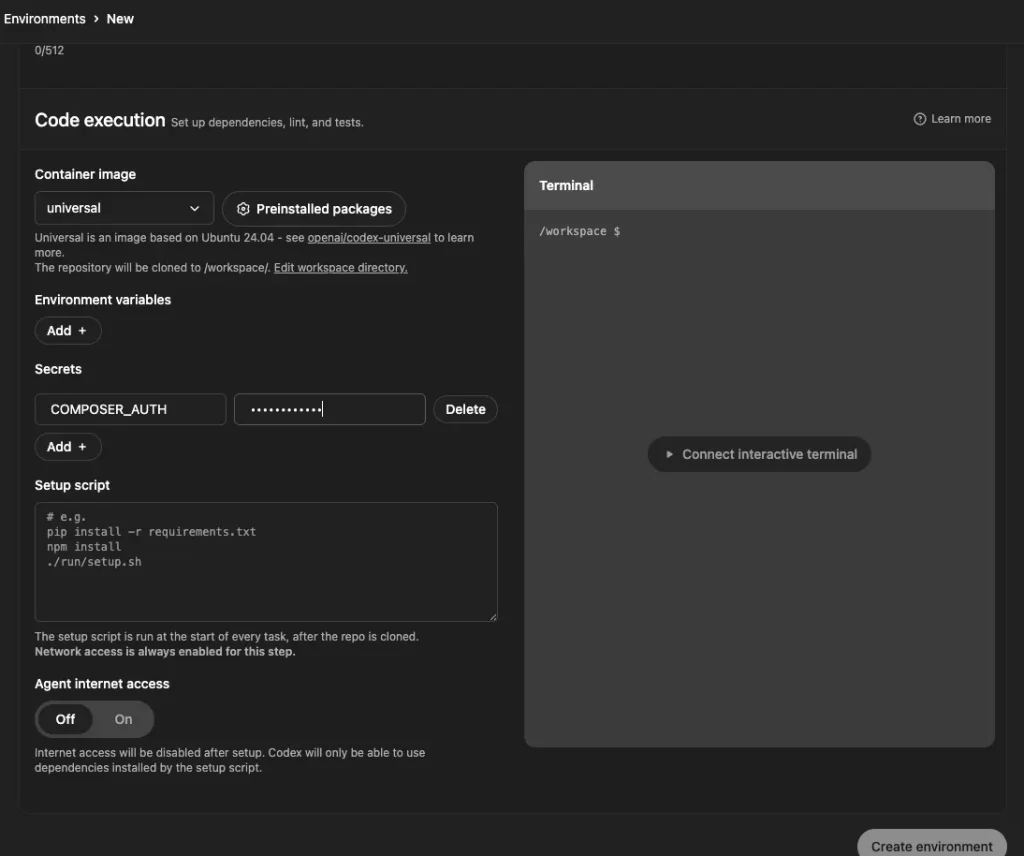
<p class="wp-block-paragraph">If you issue an access token on GitHub and register the secret on the Codex dashboard, < <code>composer install</code> > will be allowed through.</p>
<div class="wp-block-vk-blocks-step vk_step">
<div class="wp-block-vk-blocks-step-item vk_step_item vk_step_item_lineStyle-default"><div class="vk_step_item_content">
<h4 class="wp-block-heading">Issue an access token on GitHub</h4>
<figure data-wp-context="{"imageId":"6a25cfb9dd704"}" data-wp-interactive="core/image" data-wp-key="6a25cfb9dd704" class="wp-block-image size-full wp-lightbox-container"><img data-wp-class--hide="state.isContentHidden" data-wp-class--show="state.isContentVisible" data-wp-init="callbacks.setButtonStyles" data-wp-on--click="actions.showLightbox" data-wp-on--load="callbacks.setButtonStyles" data-wp-on--pointerdown="actions.preloadImage" data-wp-on--pointerenter="actions.preloadImageWithDelay" data-wp-on--pointerleave="actions.cancelPreload" data-wp-on-window--resize="callbacks.setButtonStyles" src="https://wakatchi.dev/wp-content/uploads/2025/06/openai-codex-composer-auth-private-repo-1.webp" alt="Issuing a token for Composer on the GitHub Personal Access Token creation screen" class="wp-image-2288"/><button
class="lightbox-trigger"
type="button"
aria-haspopup="dialog"
data-wp-bind--aria-label="state.thisImage.triggerButtonAriaLabel"
data-wp-init="callbacks.initTriggerButton"
data-wp-on--click="actions.showLightbox"
data-wp-style--right="state.thisImage.buttonRight"
data-wp-style--top="state.thisImage.buttonTop"
>
<svg xmlns="http://www.w3.org/2000/svg" width="12" height="12" fill="none" viewBox="0 0 12 12">
<path fill="#fff" d="M2 0a2 2 0 0 0-2 2v2h1.5V2a.5.5 0 0 1 .5-.5h2V0H2Zm2 10.5H2a.5.5 0 0 1-.5-.5V8H0v2a2 2 0 0 0 2 2h2v-1.5ZM8 12v-1.5h2a.5.5 0 0 0 .5-.5V8H12v2a2 2 0 0 1-2 2H8Zm2-12a2 2 0 0 1 2 2v2h-1.5V2a.5.5 0 0 0-.5-.5H8V0h2Z" />
</svg>
</button></figure>
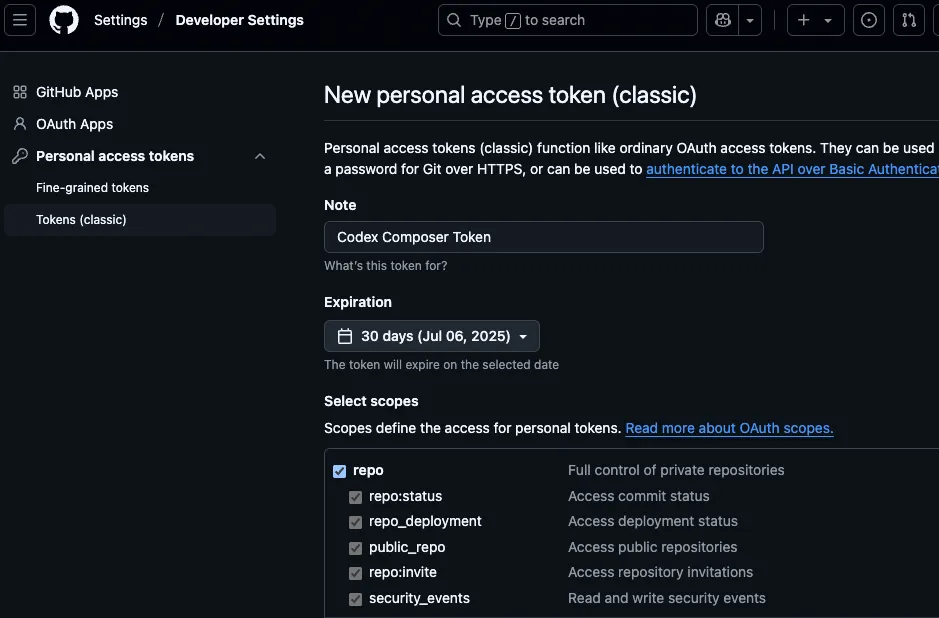
<p class="wp-block-paragraph">Issue an access token (PAT) in your account's settings > Developer settings > Personal access tokens.</p>
<p class="wp-block-paragraph">Both fine-grained and classic tokens are OK.</p>
<p class="wp-block-paragraph"><code>repo</code> If you have a scope, that's OK.<sup data-fn="675f0b57-8c93-40e2-912b-aa6398941f09" class="fn"><a id="675f0b57-8c93-40e2-912b-aa6398941f09-link" href="#675f0b57-8c93-40e2-912b-aa6398941f09">3</a></sup></p>
</div><div class="vk_step_item_dot vk_step_item_style-outlined has-text-color has-luminous-vivid-orange-color"><div class="vk_step_item_dot_caption">ステップ</div><div class="vk_step_item_dot_num">1</div></div></div>
<div class="wp-block-vk-blocks-step-item vk_step_item vk_step_item_lineStyle-default"><div class="vk_step_item_content">
<h4 class="wp-block-heading">Creating JSON on a single line</h4>
<p class="wp-block-paragraph">Create a string using the issued access token.</p>
<p class="wp-block-paragraph"><code>{"github-oauth":{"github.com":"<PAT>"}}</code></p>
</div><div class="vk_step_item_dot vk_step_item_style-outlined has-text-color has-luminous-vivid-orange-color"><div class="vk_step_item_dot_caption">ステップ</div><div class="vk_step_item_dot_num">2</div></div></div>
<div class="wp-block-vk-blocks-step-item vk_step_item vk_step_item_lineStyle-default"><div class="vk_step_item_content">
<h4 class="wp-block-heading">Add COMPOSER_AUTH in Codex → <strong>Environment</strong> → <strong>Secrets</strong></h4>
<figure data-wp-context="{"imageId":"6a25cfb9ddf03"}" data-wp-interactive="core/image" data-wp-key="6a25cfb9ddf03" class="wp-block-image size-large wp-lightbox-container"><img data-wp-class--hide="state.isContentHidden" data-wp-class--show="state.isContentVisible" data-wp-init="callbacks.setButtonStyles" data-wp-on--click="actions.showLightbox" data-wp-on--load="callbacks.setButtonStyles" data-wp-on--pointerdown="actions.preloadImage" data-wp-on--pointerenter="actions.preloadImageWithDelay" data-wp-on--pointerleave="actions.cancelPreload" data-wp-on-window--resize="callbacks.setButtonStyles" src="https://wakatchi.dev/wp-content/uploads/2025/06/openai-codex-composer-auth-private-repo-2-1024x856.webp" alt="Environment settings screen with COMPOSER_AUTH registered in the Secrets section of OpenAI Codex" class="wp-image-2294"/><button
class="lightbox-trigger"
type="button"
aria-haspopup="dialog"
data-wp-bind--aria-label="state.thisImage.triggerButtonAriaLabel"
data-wp-init="callbacks.initTriggerButton"
data-wp-on--click="actions.showLightbox"
data-wp-style--right="state.thisImage.buttonRight"
data-wp-style--top="state.thisImage.buttonTop"
>
<svg xmlns="http://www.w3.org/2000/svg" width="12" height="12" fill="none" viewBox="0 0 12 12">
<path fill="#fff" d="M2 0a2 2 0 0 0-2 2v2h1.5V2a.5.5 0 0 1 .5-.5h2V0H2Zm2 10.5H2a.5.5 0 0 1-.5-.5V8H0v2a2 2 0 0 0 2 2h2v-1.5ZM8 12v-1.5h2a.5.5 0 0 0 .5-.5V8H12v2a2 2 0 0 1-2 2H8Zm2-12a2 2 0 0 1 2 2v2h-1.5V2a.5.5 0 0 0-.5-.5H8V0h2Z" />
</svg>
</button><figcaption class="wp-element-caption">Adding COMPOSER_AUTH to the Codex Secrets allows Composer to authenticate access to private repositories.</figcaption></figure>
<p class="wp-block-paragraph">Copy and paste the JSON created in step 2 into the value of COMPSER_AUTH.</p>
<p class="wp-block-paragraph">If you simply copy and paste the access token as is, authentication will fail.</p>
<p class="wp-block-paragraph">I completely forgot that it was in JSON format and wasted hours troubleshooting it.</p>
</div><div class="vk_step_item_dot vk_step_item_style-outlined has-text-color has-luminous-vivid-orange-color"><div class="vk_step_item_dot_caption">ステップ</div><div class="vk_step_item_dot_num">3</div></div></div>
<div class="wp-block-vk-blocks-step-item vk_step_item vk_step_item_lineStyle-none"><div class="vk_step_item_content">
<h4 class="wp-block-heading">Check with Setup Script just to be sure</h4>
<figure data-wp-context="{"imageId":"6a25cfb9de460"}" data-wp-interactive="core/image" data-wp-key="6a25cfb9de460" class="wp-block-image size-large wp-lightbox-container"><img data-wp-class--hide="state.isContentHidden" data-wp-class--show="state.isContentVisible" data-wp-init="callbacks.setButtonStyles" data-wp-on--click="actions.showLightbox" data-wp-on--load="callbacks.setButtonStyles" data-wp-on--pointerdown="actions.preloadImage" data-wp-on--pointerenter="actions.preloadImageWithDelay" data-wp-on--pointerleave="actions.cancelPreload" data-wp-on-window--resize="callbacks.setButtonStyles" src="https://wakatchi.dev/wp-content/uploads/2025/06/openai-codex-composer-auth-private-repo-3-1024x506.jpg" alt="COMPOSER_AUTH is correctly reflected in the OpenAI Codex terminal, and composer authentication is successful." class="wp-image-2297"/><button
class="lightbox-trigger"
type="button"
aria-haspopup="dialog"
data-wp-bind--aria-label="state.thisImage.triggerButtonAriaLabel"
data-wp-init="callbacks.initTriggerButton"
data-wp-on--click="actions.showLightbox"
data-wp-style--right="state.thisImage.buttonRight"
data-wp-style--top="state.thisImage.buttonTop"
>
<svg xmlns="http://www.w3.org/2000/svg" width="12" height="12" fill="none" viewBox="0 0 12 12">
<path fill="#fff" d="M2 0a2 2 0 0 0-2 2v2h1.5V2a.5.5 0 0 1 .5-.5h2V0H2Zm2 10.5H2a.5.5 0 0 1-.5-.5V8H0v2a2 2 0 0 0 2 2h2v-1.5ZM8 12v-1.5h2a.5.5 0 0 0 .5-.5V8H12v2a2 2 0 0 1-2 2H8Zm2-12a2 2 0 0 1 2 2v2h-1.5V2a.5.5 0 0 0-.5-.5H8V0h2Z" />
</svg>
</button></figure>
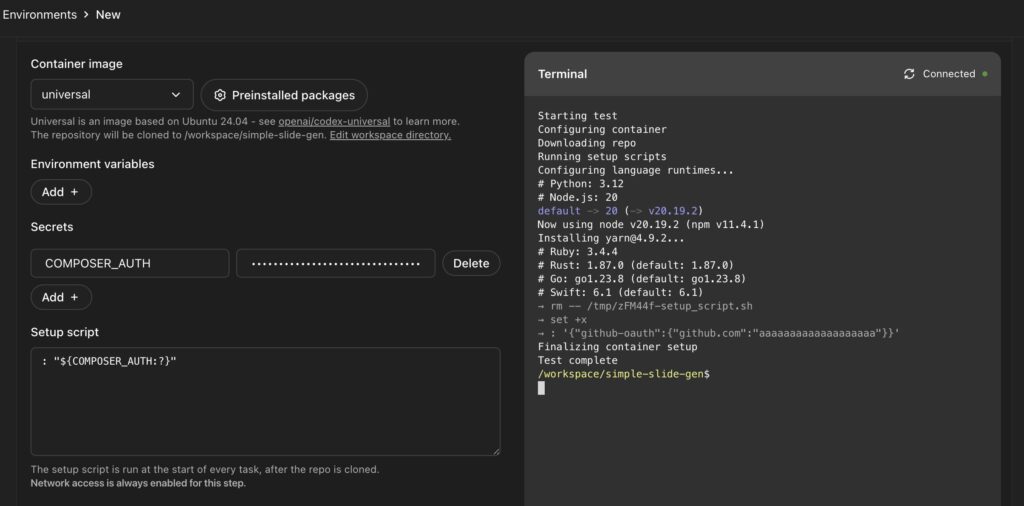
<p class="wp-block-paragraph">Setup Scriptで<code>: "${COMPOSER_AUTH:?}"</code>と記述し、ターミナルで実行してみると、<span data-color="#ff6900" style="background: linear-gradient(transparent 60%,rgba(255, 105, 0, 0.7) 0);" class="vk_highlighter">COMPOSER_AUTH</span>が正しく設定いるかを確認します。</p>
<p class="wp-block-paragraph">Check the execution result in the terminal to confirm that the JSON you set in step 2 is set correctly.</p>
<div class="hcb_wrap"><pre class="prism line-numbers lang-bash" data-lang="Bash"><code>: "${COMPOSER_AUTH:?}"</code></pre></div>
</div><div class="vk_step_item_dot vk_step_item_style-outlined has-text-color has-luminous-vivid-orange-color"><div class="vk_step_item_dot_caption">ステップ</div><div class="vk_step_item_dot_num">4</div></div></div>
</div>
<hr class="wp-block-separator has-alpha-channel-opacity"/>
<h2 class="wp-block-heading" id="vk-htags-35926af7-9d05-472a-ac9d-789cfaa1f8f4">Troubleshooting & Best Practices</h2>
<div class="wp-block-vk-blocks-spacer vk_spacer vk_spacer-type-margin-top"><div class="vk_block-margin-sm--margin-top"></div></div>
<h4 class="wp-block-heading" id="vk-htags-a84309fa-8f4c-4281-b9d5-02e91c191b61" style="font-size:18px"><strong>404: Invalid access token</strong></h4>
<p class="wp-block-paragraph">I suspect the PAT has expired or has insufficient scope.<sup data-fn="4e273f8b-b29c-4d0a-a6df-ec1a18fbf3e8" class="fn"><a id="4e273f8b-b29c-4d0a-a6df-ec1a18fbf3e8-link" href="#4e273f8b-b29c-4d0a-a6df-ec1a18fbf3e8">4</a></sup></p>
<p class="wp-block-paragraph">Check with the following command.</p>
<div class="hcb_wrap"><pre class="prism line-numbers lang-bash" data-lang="Bash"><code>curl -H "Authorization: token <PAT>" https://api.github.com/user</code></pre></div>
<div class="wp-block-vk-blocks-spacer vk_spacer vk_spacer-type-margin-top"><div class="vk_block-margin-sm--margin-top"></div></div>
<h4 class="wp-block-heading" id="vk-htags-139a447d-2891-41b1-b078-a302388c8e2a"><strong>Parse error due to newline in JSON</strong></h4>
<p class="wp-block-paragraph">Remove line breaks in the editor or use VS Code's "Make single line" command to format.</p>
<h4 class="wp-block-heading" id="vk-htags-2603cee0-75fc-413f-92a2-3893c5bc3427"><strong>CI/CD requires PAT for a different repository</strong></h4>
<p class="wp-block-paragraph"><code>GITHUB_TOKEN</code> Since is limited to the target repository, the basic approach is to issue a <em>PAT and set it as a secret variable.</em></p>
<h4 class="wp-block-heading" id="vk-htags-626e2086-0272-4355-8600-6027b84becfa"><strong>Stack Overflow Case Studies</strong></h4>
<p class="wp-block-paragraph">GitLab CI also requires <code>COMPOSER_AUTH</code>, and if it is not set, the build will fail.<sup data-fn="f22beb40-8cf4-4a63-a511-6ca4ca65d468" class="fn"><a id="f22beb40-8cf4-4a63-a511-6ca4ca65d468-link" href="#f22beb40-8cf4-4a63-a511-6ca4ca65d468">5</a></sup></p>
<p class="wp-block-paragraph">Some people prefer SSH Instead, but Codex says it's easier to do it using just the environment variables.<sup data-fn="f7686990-96db-41c5-81ec-be20a5720c8e" class="fn"><a id="f7686990-96db-41c5-81ec-be20a5720c8e-link" href="#f7686990-96db-41c5-81ec-be20a5720c8e">6</a></sup></p>
<hr class="wp-block-separator has-alpha-channel-opacity"/>
<h2 class="wp-block-heading" id="vk-htags-2c2c0033-223e-4003-8438-078295fcf107">Conclusion</h2>
<p class="wp-block-paragraph" style="font-size:18px">Since Codex is an "<span data-color="#fcb900" style="background: linear-gradient(transparent 60%,rgba(252, 185, 0, 0.7) 0);" class="vk_highlighter">AI agent that runs code in a container,</span>" handling authentication to external services is key.</p>
<p class="wp-block-paragraph" style="font-size:18px">If you prepare <strong><span data-color="#ff6900" style="background: linear-gradient(transparent 60%,rgba(255, 105, 0, 0.7) 0);" class="vk_highlighter">COMPOSER_AUTH</span></strong> as a secret, you can instantly solve the common problem of private repositories around Composer, and your setup script will also be neater.</p>
<div class="wp-block-vk-blocks-balloon vk_balloon vk_balloon-position-left vk_balloon-type-speech vk_balloon-animation-none"><div class="vk_balloon_icon"><figure><img class="vk_balloon_icon_image vk_balloon_icon_image-type-normal " src="https://wakatchi.dev/wp-content/uploads/2022/07/wakatchi_icon_2.jpg" alt=""/><figcaption class="vk_balloon_icon_name">わかっち</figcaption></figure></div><div class="vk_balloon_content_outer"><div class="vk_balloon_content has-background-color has-luminous-vivid-amber-background-color "><span class="vk_balloon_content_before has-text-color has-luminous-vivid-amber-color"></span><span class="vk_balloon_content_after "></span>
<p class="wp-block-paragraph">これでもう <code>auth.json</code> を.gitIgnoreし忘れて焦る日々とはおさらば!</p>
</div></div></div>
<p class="wp-block-paragraph" style="font-size:18px">Use the information in this article to eliminate any potential problems and enjoy a fun Codex life.</p>
<p class="wp-block-paragraph" style="font-size:18px">I hope this article is of some help.</p>
<p class="wp-block-paragraph" style="font-size:18px">Thank you for reading to the end!</p>
<h6 class="wp-block-heading" id="vk-htags-d83403ff-52f5-4764-9ebc-928fc3e39b8d">References</h6>
<ol class="wp-block-footnotes"><li id="9c31462e-15b1-424f-bb7e-231d527049bd"><a href="https://github.com/shivammathur/setup-php/issues/107" target="_blank" data-type="link" data-id="https://github.com/shivammathur/setup-php/issues/107" rel="noreferrer noopener nofollow">Documentation on using composer with private repositories</a> <a href="#9c31462e-15b1-424f-bb7e-231d527049bd-link" aria-label="Jump to footnote reference 1">↩︎</a></li><li id="741a1138-3db3-4a17-be42-b24867f8b82a"><a href="https://dev.to/javiereguiluz/how-to-make-chatgpt-codex-work-with-php-and-symfony-4lj8" target="_blank" rel="noreferrer noopener nofollow">How to Make ChatGPT Codex Work with PHP and Symfony</a> <a href="#741a1138-3db3-4a17-be42-b24867f8b82a-link" aria-label="Jump to footnote reference 2">↩︎</a></li><li id="675f0b57-8c93-40e2-912b-aa6398941f09"><a href="https://gist.github.com/jeffersonmartin/d0d4a8dfec90d224d14f250b36c74d2f" data-type="link" data-id="https://gist.github.com/jeffersonmartin/d0d4a8dfec90d224d14f250b36c74d2f" target="_blank" rel="noreferrer noopener nofollow">enerate a GitHub Personal Access Token for Private Composer Packages</a> <a href="#675f0b57-8c93-40e2-912b-aa6398941f09-link" aria-label="Jump to footnote reference 3">↩︎</a></li><li id="4e273f8b-b29c-4d0a-a6df-ec1a18fbf3e8"><a href="https://github.com/shivammathur/setup-php/issues/107" target="_blank" data-type="link" data-id="https://github.com/shivammathur/setup-php/issues/107" rel="noreferrer noopener nofollow">Documentation on using composer with private repositories</a> <a href="#4e273f8b-b29c-4d0a-a6df-ec1a18fbf3e8-link" aria-label="Jump to footnote reference 4">↩︎</a></li><li id="f22beb40-8cf4-4a63-a511-6ca4ca65d468"><a href="https://github.com/shivammathur/setup-php/issues/107" data-type="link" data-id="https://github.com/shivammathur/setup-php/issues/107"></a><a href="https://stackoverflow.com/questions/66896749/gitlab-autodeploy-laravel-private-repo-composer-install-composer-auth-env-var-no">Gitlab A</a><a href="https://stackoverflow.com/questions/66896749/gitlab-autodeploy-laravel-private-repo-composer-install-composer-auth-env-var-no" data-type="link" data-id="https://stackoverflow.com/questions/66896749/gitlab-autodeploy-laravel-private-repo-composer-install-composer-auth-env-var-no" target="_blank" rel="noreferrer noopener nofollow">utodeploy Laravel private repo composer install COMPOSER_AUTH env var not read</a> <a href="#f22beb40-8cf4-4a63-a511-6ca4ca65d468-link" aria-label="Jump to footnote reference 5">↩︎</a></li><li id="f7686990-96db-41c5-81ec-be20a5720c8e"><a href="https://stackoverflow.com/questions/40619393/how-to-add-private-github-repository-as-composer-dependency" target="_blank" data-type="link" data-id="https://stackoverflow.com/questions/40619393/how-to-add-private-github-repository-as-composer-dependency" rel="noreferrer noopener nofollow">How to add private github repository as Composer dependency Ask Question</a> <a href="#f7686990-96db-41c5-81ec-be20a5720c8e-link" aria-label="Jump to footnote reference 6">↩︎</a></li></ol>
<p class="wp-block-paragraph"></p>
There are some required settings when connecting to a private GitHub repository with OpenAI Codex, so I'll make a note of them here.
TL;DR;
If you want to access a private GitHub repository when resolving Composer dependencies in an OpenAI Codex environment, the standard approach is to pass COMPOSER_AUTH, which is a JSON wrapper around a GitHub PAT (Personal Access Token), as a secret.
You can use Composer's "environment variable-based authentication" mechanism as is, and Codex will automatically inject secrets into the container, so you don't have to commit unnecessary configuration files.
When setting the secret in the Codex, don't forget to wrap it in JSON with < github-oauth > instead of the access token itself.
Introduction
When I recently came across the Codex, < composer install > got stuck on 404/authentication required.
After some research, it seems that the Codex setup script runs under a Docker container + network restrictions, so Composer was unable to shake hands with GitHub.
The solution is to register COMPOSER_AUTH as a Codex secret... I came to this conclusion, which is a pretty obvious one, so I'll summarize the steps and some pitfalls as a memo.
この記事は次のような方にお勧めです
Developers who want to run PHP/Composer projects on the OpenAI Codex
People who want to build projects that depend on private GitHub repositories
Engineers who want to make secret management smarter using CI/CD and cloud IDE
composer installPeople who are stuck on 404 / authentication required
People who want to learn best practices for PAT + COMPOSER_AUTH
The value is just the same JSON as < auth.json{"github-oauth":{"github.com":"ghp_xxxxx..."}} > stored “on one line” (in the Codex, just paste it into the secret described below).
This method does not require you to store authentication information in the repository, so it is safe from a GitOps perspective.1
GITHUB_TOKEN So that's not okay?
In GitHub Actions, you can GITHUB_TOKENs using the automatically generated < wpml_ignored_tag >. However...
Narrow scope of effect < GITHUB_TOKEN > is limited to that repository, so it is not sufficient in cases where you want to resolve cross-organizational dependencies.
Short-lived: Issued for each runner execution and cannot be reused by external services (such as Composer containers).
Not compatible with Composer's authentication format Composer will not recognize < GITHUB_TOKEN > if you simply pass it to the environment variable, so you need to rewrite < auth.json > with an additional script.
Considering these points, it is easier and safer to put COMPOSER_AUTH as a secret, as it is always available and can be done with just one JSON.
"Dedicated PAT" rather than "limited token" is the GitOps best practice.
Why does the Codex require COMPOSER_AUTH?
Codex is designed to run code in isolated containers, either locally or in the cloud
The container does not have a GitHub PAT, so the app cannot obtain the dependent libraries it needs,composer install and fails.
Codex's Environment <>> Secrets can pass environment variables and secrets.
Works well with Composer's environment variable authentication → COMPOSER_AUTH is the only choice
The same steps are covered in a how-to article on dev.to, and are a common path for many PHP developers.2
Registering secrets in the Codex environment
If you issue an access token on GitHub and register the secret on the Codex dashboard, < composer install > will be allowed through.
Issue an access token on GitHub
Issue an access token (PAT) in your account's settings > Developer settings > Personal access tokens.
Remove line breaks in the editor or use VS Code's "Make single line" command to format.
CI/CD requires PAT for a different repository
GITHUB_TOKEN Since is limited to the target repository, the basic approach is to issue a PAT and set it as a secret variable.
Stack Overflow Case Studies
GitLab CI also requires COMPOSER_AUTH, and if it is not set, the build will fail.5
Some people prefer SSH Instead, but Codex says it's easier to do it using just the environment variables.6
Conclusion
Since Codex is an "AI agent that runs code in a container," handling authentication to external services is key.
If you prepare COMPOSER_AUTH as a secret, you can instantly solve the common problem of private repositories around Composer, and your setup script will also be neater.

わかっち
これでもう auth.json を.gitIgnoreし忘れて焦る日々とはおさらば!
Use the information in this article to eliminate any potential problems and enjoy a fun Codex life.